Anlage EKS: what belongs in every item and every table row
The Anlage EKS declares income from self-employed or freelance work to the Jobcenter: 9 pages, 60 numbered items and five pages of monthly tables. It is filled in TWICE per approval period, at the start with estimated figures and at the end with the actual ones. And it carries TWO signatures: the applicant signs sections A to D, the self-employed person signs sections F to G. If that is the same person, they sign twice. This guide walks through the form page by page: above you see the original page, below it what belongs in each item and each table row. The fields on the images are interactive: hover over them or tap them. In the monthly tables every cell explains its row, whichever month column you land on.
1. Page 1: two people, the period and the type of declaration (items 1-9)
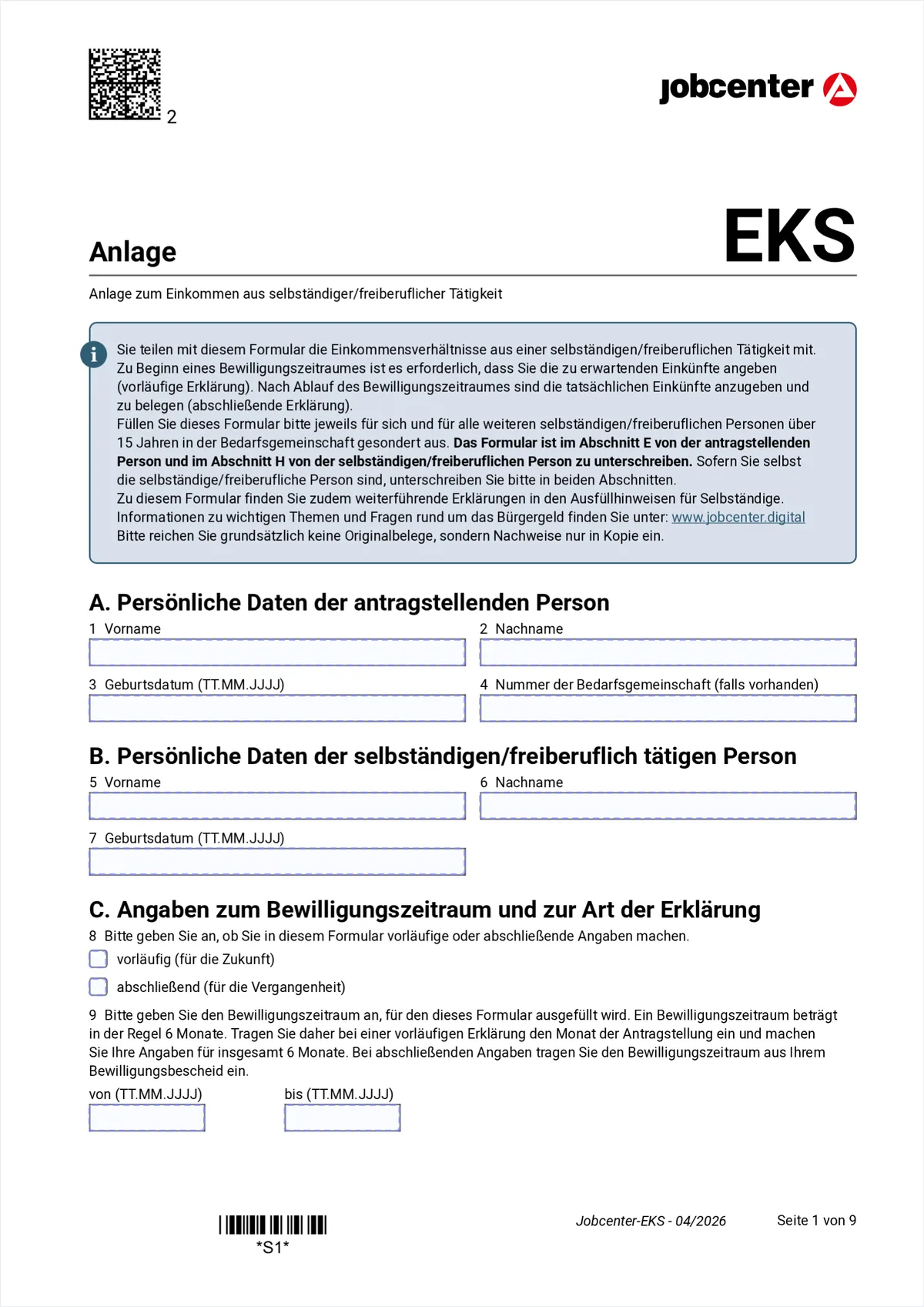
Hover or tap a marked field to see the explanation. As with EK and WEP it is about two people: section A is the applicant, section B the self-employed one. Item 8 sets the mode you are filling the form in, and that governs every figure further back.
- 1-3
- First name, surname and date of birth of the applicant.
- 4
- Bedarfsgemeinschaft number, if you have one. It is printed at the top of every letter from the Jobcenter.
- 5-7
- First name, surname and date of birth of the self-employed or freelance person. Every such person in the Bedarfsgemeinschaft gets their own EKS.
- 8
- Vorläufig or abschließend. Vorläufig means you estimate the figures for the coming months. Abschließend means the period is over and you enter the actual figures with evidence. So the same EKS is filled in twice.
- 9
- The approval period, usually 6 months. For a preliminary declaration enter the month of the application and count 6 months; for a final one take the period from your approval decision.
Section A: who is applying
Section B: the self-employed person
Section C: period and mode
2. Page 2: business master data and the first signature (items 10-22)
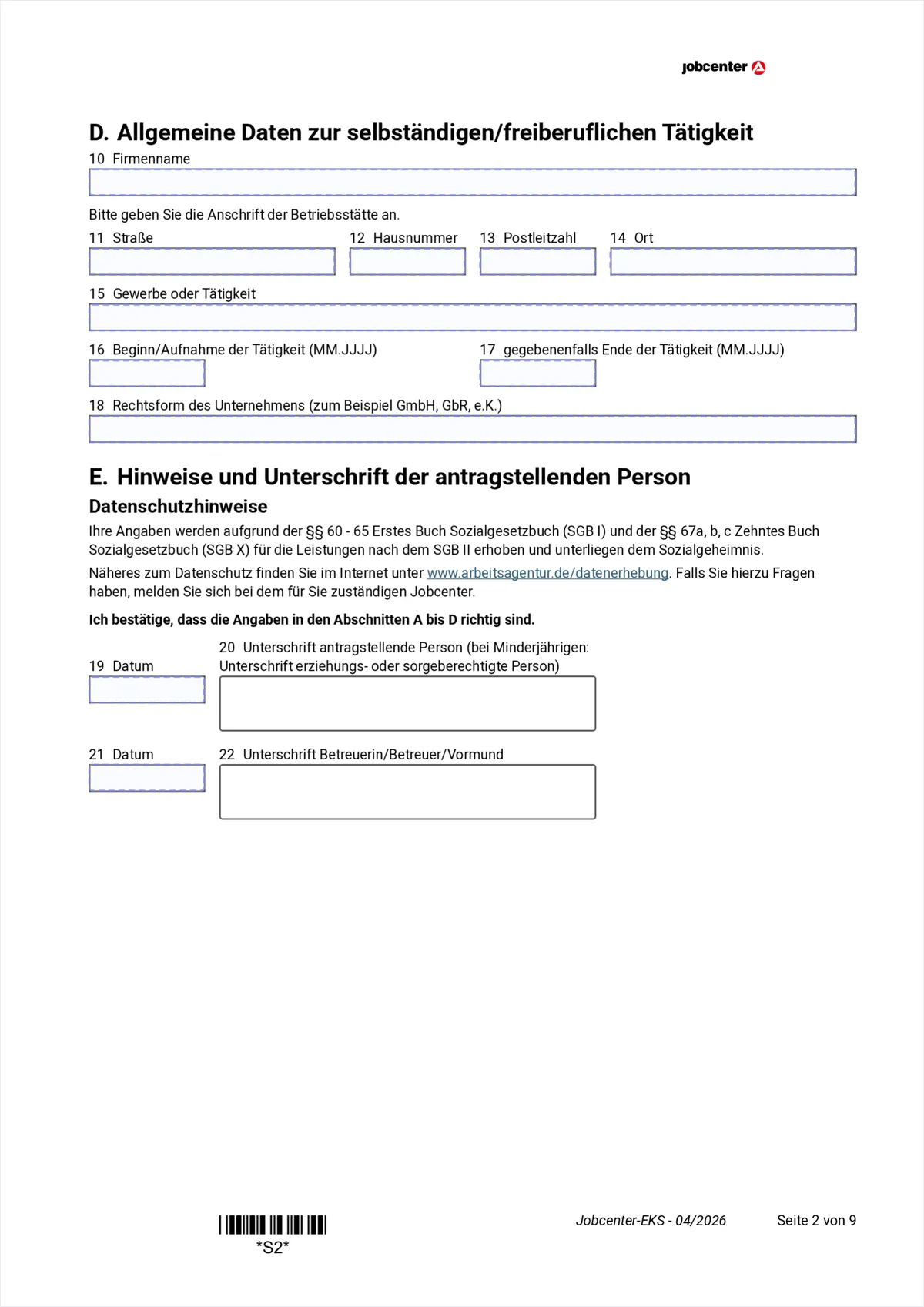
Hover or tap a marked field to see the explanation. The business master data at the top, the first signature already at the bottom. It only covers sections A to D; the second signature is on page 9.
- 10
- Company name. Without a registered company your own name is enough.
- 11-14
- Address of the business premises: street, house number, postcode, town. If you work from home, that is your home address.
- 15
- Trade or activity, that is what you actually do. It is on the Gewerbeschein.
- 16-17
- Start of the activity in the format MM.YYYY and, if it ended, the end date.
- 18
- Legal form of the business, for example Einzelunternehmen, GbR, GmbH or e. K.
- 19-20
- Date and signature. With this you confirm sections A to D, not the figures. Those come on page 9.
- 21-22
- Only with legal guardianship: date and signature of the guardian.
Section D: the business
Section E: the applicant's signature
3. Page 3: rooms, staff, VAT, subsidies and loans (items 23-41)
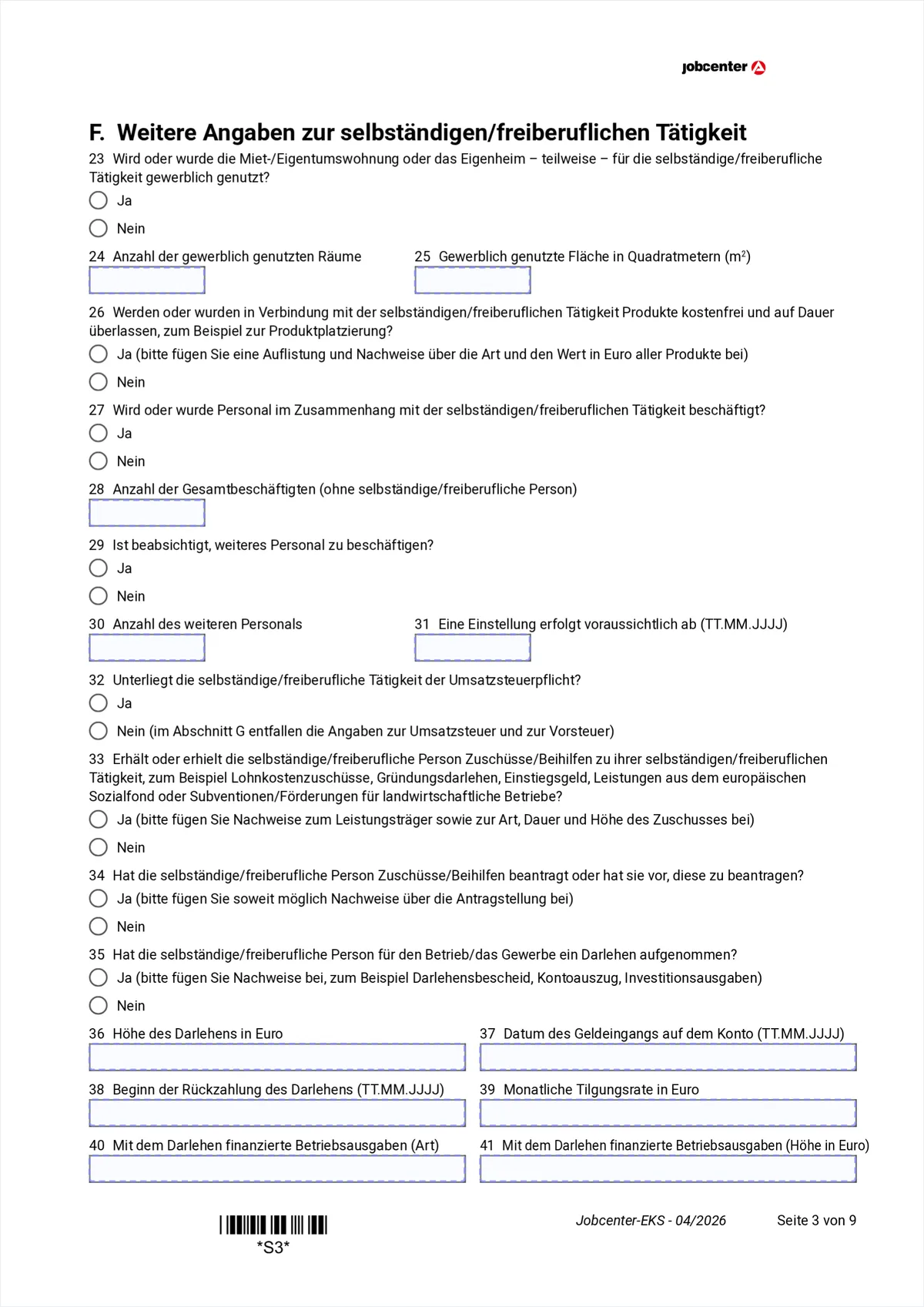
Hover or tap a marked field to see the explanation. The page of switches. Item 32 is the most important: if you are not liable for VAT, all the VAT rows in the tables later stay empty, which is five rows fewer.
- 23
- Is the flat or house used commercially in whole or in part. If yes, a share of the housing costs can become a business expense.
- 24-25
- Number of rooms used commercially and their area in square metres.
- 26
- Do you receive products free of charge and permanently, for example for product placement. If yes, attach a list with kind and value; those products belong in row A3 later.
- 27-28
- Do you employ staff and how many people in total, excluding yourself.
- 29-31
- Is more staff planned, how many and from when.
- 32
- VAT liability. If no, all VAT and input-tax entries in section G are dropped, that is rows A5.1 to A5.3 as well as B17 and B18. Small businesses under § 19 UStG tick no here.
- 33-34
- Do you receive subsidies or grants, for example Einstiegsgeld, a wage subsidy or agricultural support, and have you applied for any. Attach evidence about the provider, kind, duration and amount.
- 35
- Have you taken out a loan for the business. If no, items 36 to 41 stay empty.
- 36-39
- Amount of the loan, date the money arrived, start of repayment and the monthly instalment.
- 40-41
- Which business expenses were financed with the loan and at what amount.
4. Page 4: table A, the business income (items 42-44)
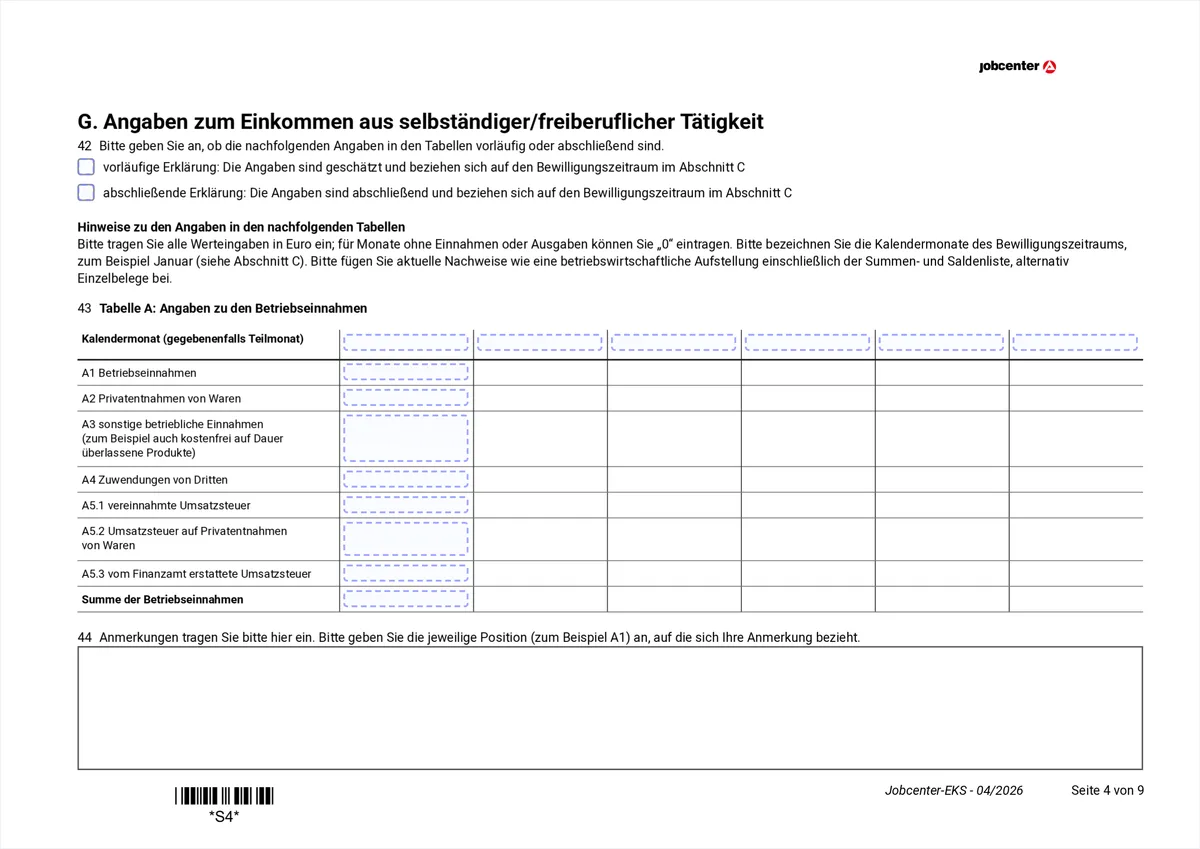
Hover or tap a marked field to see the explanation. From here on it is arithmetic. Every table has one column per calendar month of the approval period; the row says WHAT is entered, the column only WHEN. All amounts in euro, months without movement get a 0.
- 42
- Once more the confirmation of whether the figures in the tables are estimated (vorläufig) or final (abschließend). It has to match item 8.
- Head
- In the header row write the names of the calendar months, for example January to June. They follow from the period in item 9.
- A1
- Business income: everything that comes in from the activity, in the month the money ARRIVES, not the month of the invoice.
- A2
- Private withdrawals of goods: the value of goods you took out of the business for yourself.
- A3
- Other business income, for example commissions, reimbursements and the free products mentioned in item 26.
- A4
- Contributions from third parties: subsidies or gifts for the business.
- A5.1-A5.3
- The three VAT rows: VAT received, VAT on private withdrawals and VAT refunded by the tax office. With no in item 32 all three stay empty.
- Sum
- Total business income, that is A1 to A5.3 added up, per month column.
- 44
- Notes field. Name the position the note refers to, for example A1.
5. Page 5: table B part 1, the first business expenses (items 45-46)
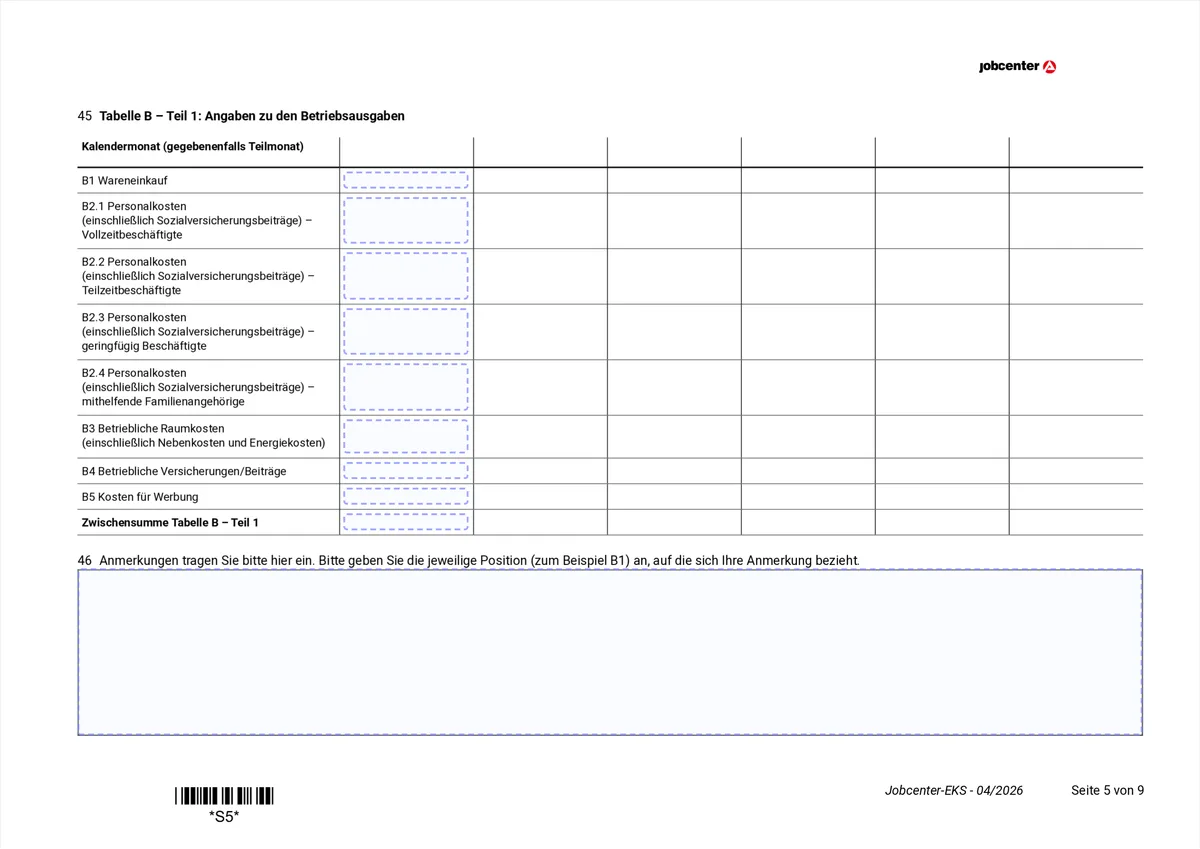
Hover or tap a marked field to see the explanation. The expense side is spread over three table parts because it does not fit on one page. The structure stays the same: the row is the type of expense, the column is the month.
- B1
- Goods purchases: goods and materials for the business.
- B2.1-B2.3
- Staff costs split into full-time, part-time and marginal employment (mini-jobs), each including social contributions.
- B3
- Premises costs of the business, that is rent and service charges. With commercial use of your flat only the proportional amount from items 24 and 25.
- B4-B5
- Further running costs such as business taxes and business insurance.
- 46
- Notes field for this table part, naming the position.
6. Page 6: table B part 2 and the vehicle costs (items 47-48)
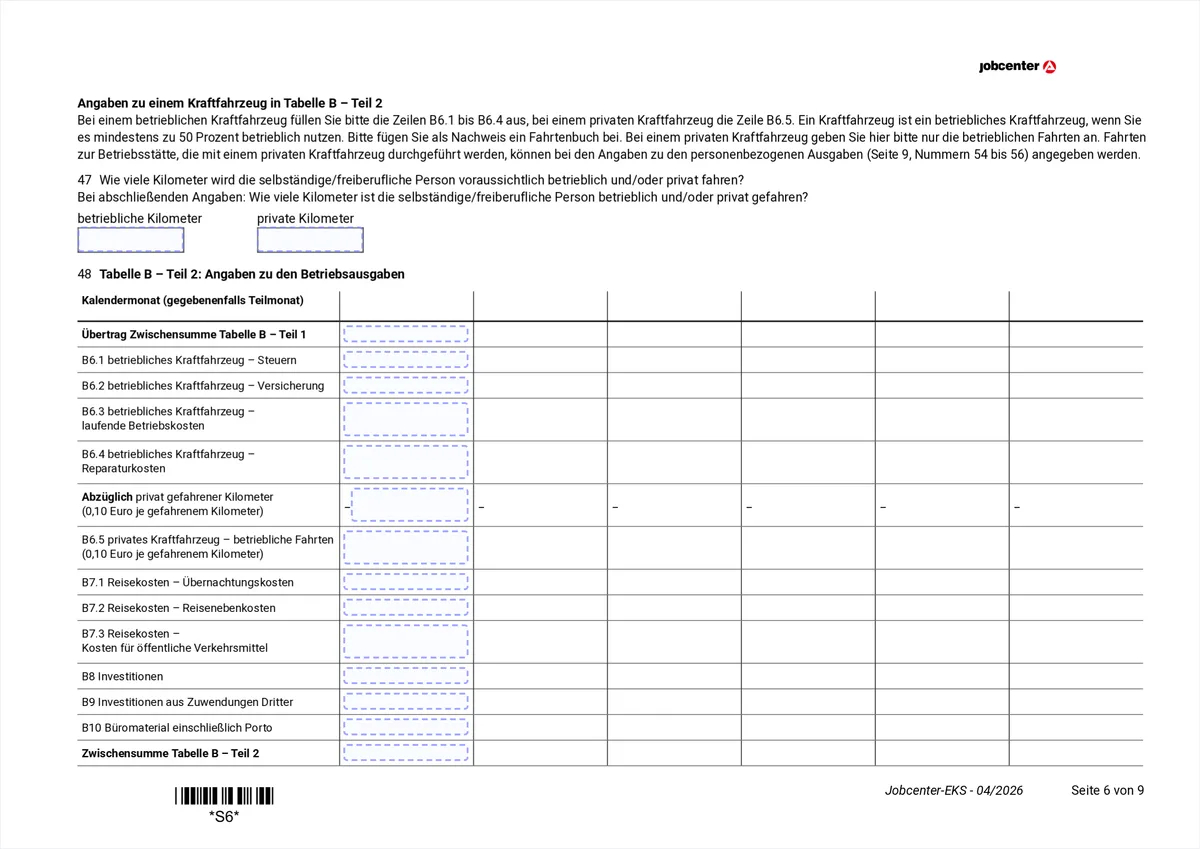
Hover or tap a marked field to see the explanation. This page holds the mileage split. It decides which share of the vehicle costs counts as a business expense at all, so it is worth working out both figures properly.
- B6
- Vehicle costs: fuel, servicing, tax and insurance, but only the business share.
- km
- Annual mileage split into business and private kilometres. The ratio of the two figures gives the business share of the vehicle costs.
- B7.1-B7.3
- Travel costs, split by own vehicle, accommodation and public transport.
- B8-B9
- Investments in fixed assets, split by whether they were paid from your own funds or from third-party contributions.
- B10
- Office supplies including postage.
- Sub
- The subtotal of this table part. It is carried over on the next page.
7. Page 7: table B part 3, total and profit (items 49-50)
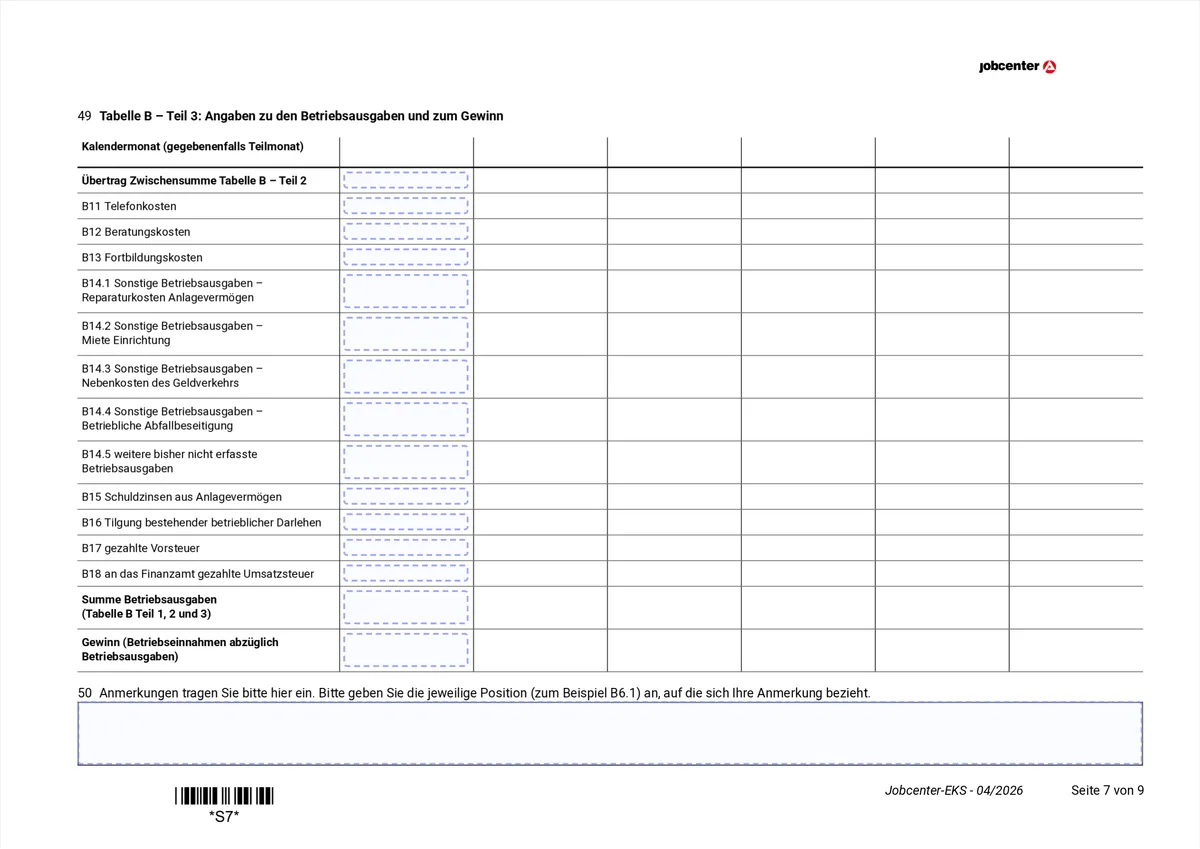
Hover or tap a marked field to see the explanation. Everything comes together here: the last expense types, the total and, right at the bottom, the profit. That single row is the figure the Jobcenter looks at in the end.
- Carry
- The subtotal from table B part 2 is entered here again.
- B11-B13
- Phone costs (business share), advisory costs such as a tax adviser or bookkeeping, and training costs.
- B14.1-B14.5
- Repairs to fixed assets, rent for equipment, banking charges, business waste disposal, and everything not yet recorded.
- B15-B16
- Debt interest on fixed assets and the repayment of existing business loans.
- B17-B18
- Input tax paid and VAT paid to the tax office. With no in item 32 both stay empty.
- Sum
- Total business expenses: parts 1, 2 and 3 together.
- Profit
- Profit: total income minus total expenses, per month. A negative figure is allowed and is entered as such.
8. Page 8: table C, what is deducted from the income (item 51)
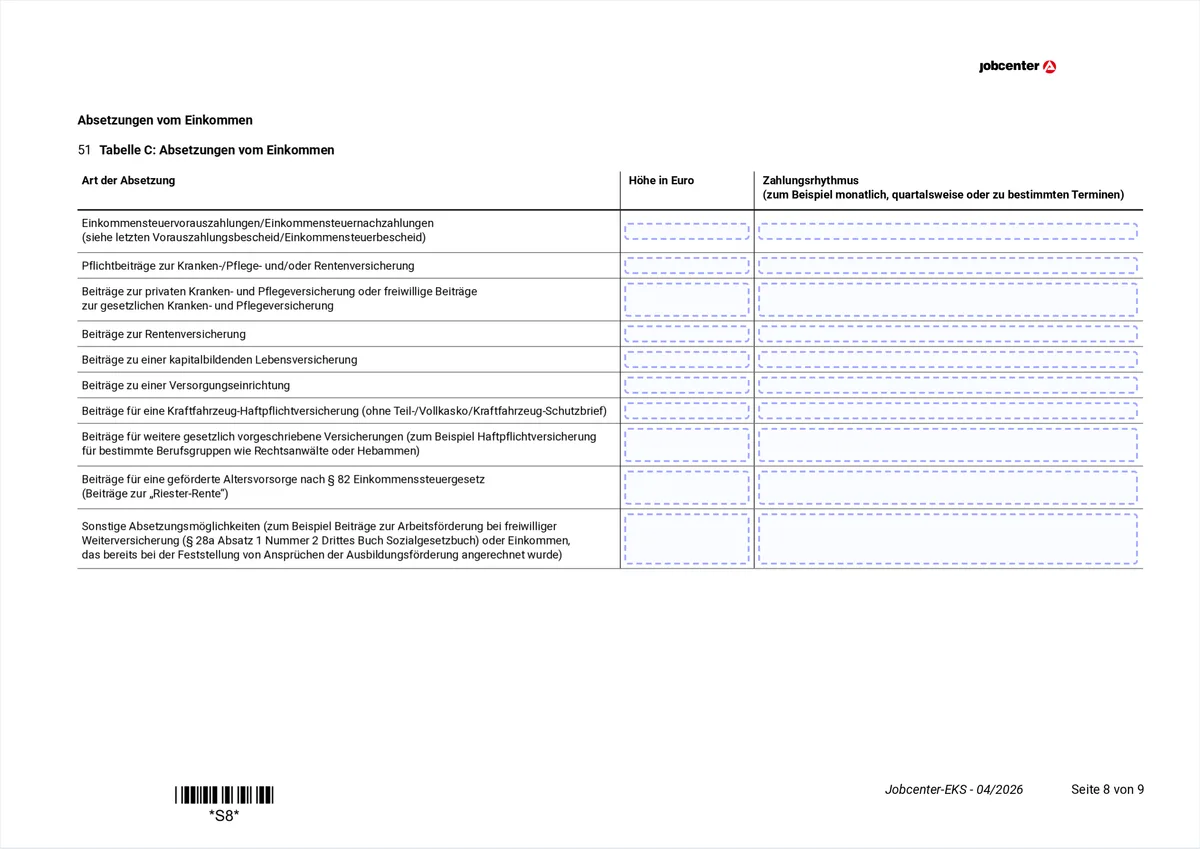
Hover or tap a marked field to see the explanation. This table is built differently from the previous ones: no month columns, but two columns per row, amount in euro and payment rhythm. Everything here lowers the countable income, so rows left empty cost money.
- Tax
- Income tax prepayments and back payments. The amount is in your latest prepayment or income tax assessment.
- KV/RV
- Compulsory contributions to health, care and pension insurance, and in a separate row private or voluntary statutory contributions.
- Pension
- Contributions to pension insurance, to a capital-forming life insurance and to a professional pension scheme.
- Kfz
- Motor third-party liability insurance without comprehensive cover and without a breakdown package.
- Legal
- Other legally required insurance, such as professional liability for lawyers or midwives.
- Riester
- Subsidised retirement provision under § 82 EStG, that is the Riester pension.
- Other
- Other deductions, for example voluntary continued insurance for employment promotion.
- Rhythm
- The right column says how often it is paid: monthly, quarterly or on specific dates. Without that the Jobcenter cannot spread the amount across the months.
9. Page 9: personal expenses and the second signature (items 52-60)
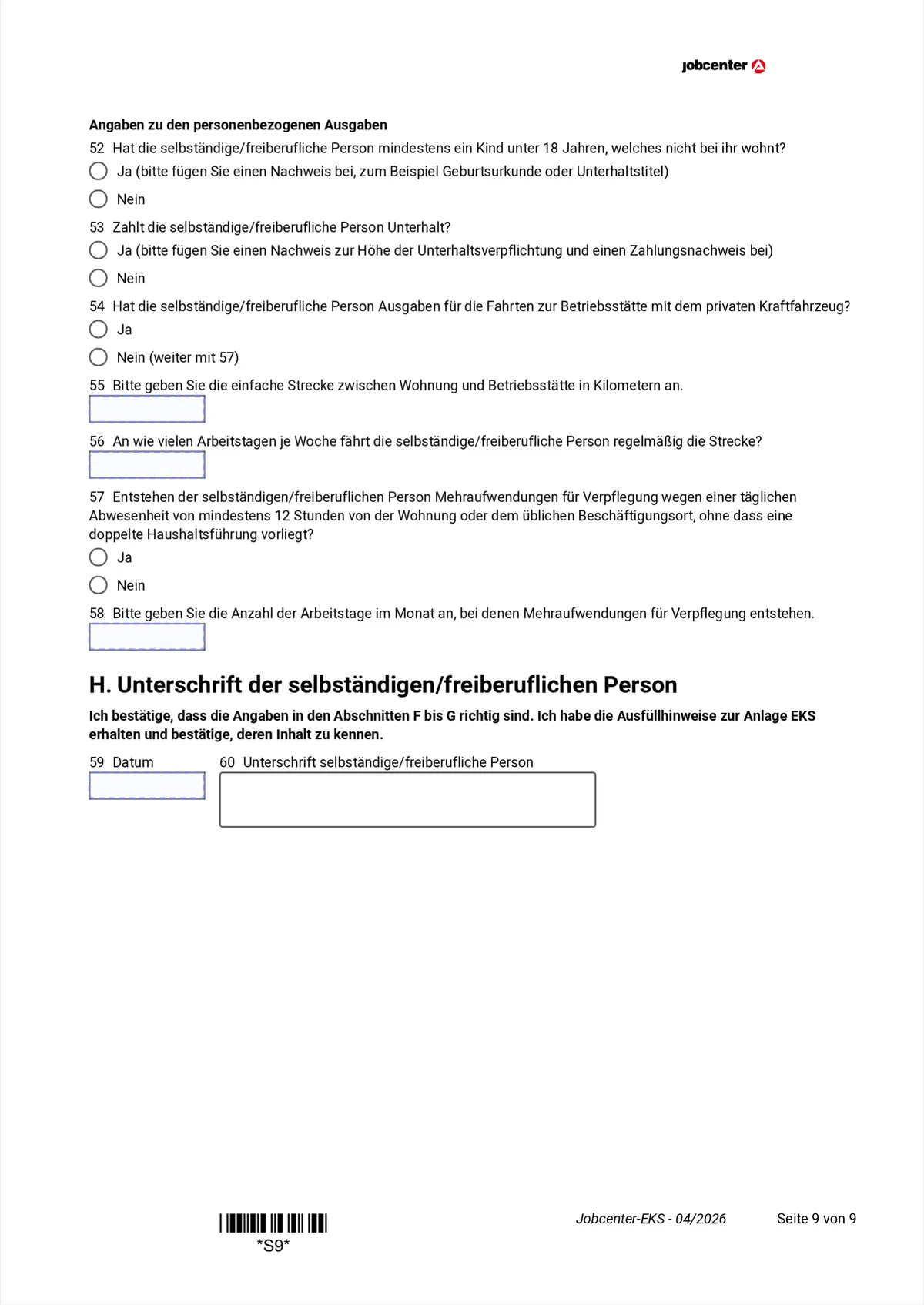
Hover or tap a marked field to see the explanation. The last deductions concern the person, not the business. And right at the bottom is the second signature, which many people miss: without it the form is incomplete.
- 52
- Does the self-employed person have a child under 18 who does NOT live with them. If yes, attach a birth certificate or a maintenance order.
- 53
- Do they pay maintenance. If yes, attach evidence of the amount AND evidence of the payments; maintenance paid reduces the countable income.
- 54
- Journeys to the business premises with the PRIVATE vehicle. If no, continue with item 57. Business journeys are already in row B6.
- 55-56
- The one-way distance between home and business premises in kilometres and the number of working days per week.
- 57-58
- Extra meal costs when away from home for at least 12 hours a day, and on how many working days per month they arise.
- 59-60
- Date and signature of the SELF-EMPLOYED person for sections F to G. If you are also the applicant, you sign here AND in section E on page 2.
Section H: the self-employed person's signature
10. How to fill in the EKS with explanations right on the form
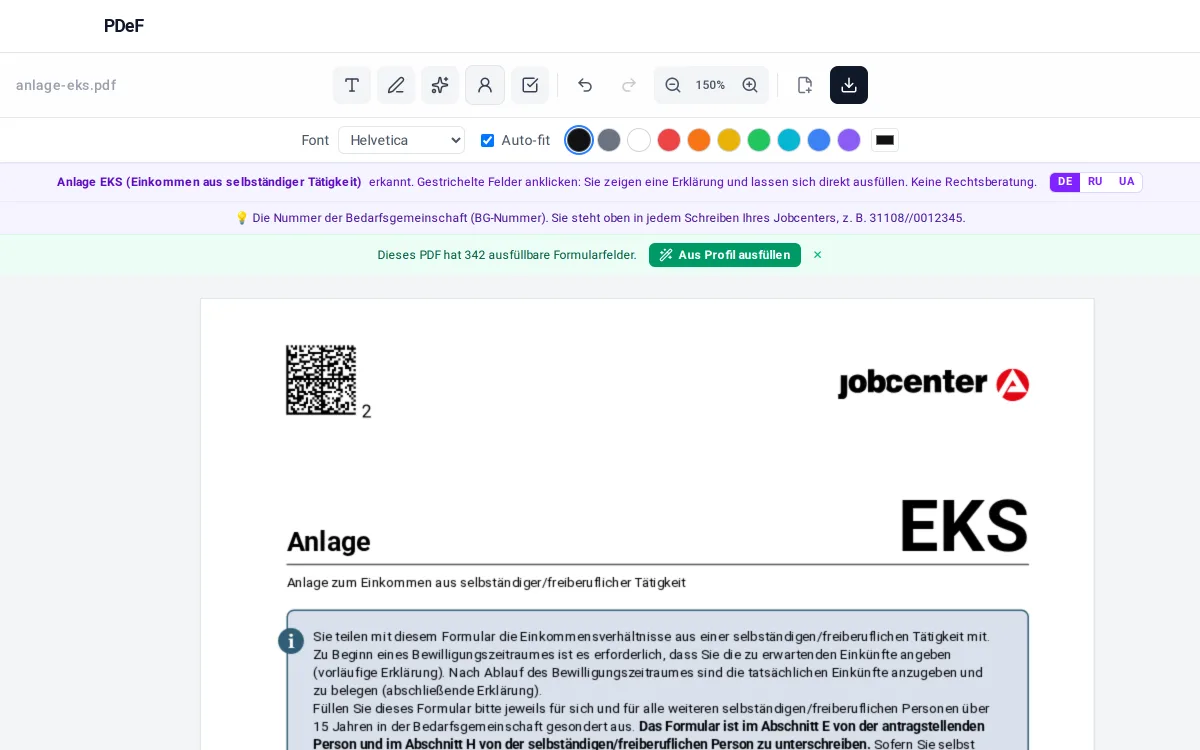
Download the Anlage EKS from jobcenter.digital or arbeitsagentur.de and open it in the free PDeF editor in your browser. The editor recognises the form automatically and explains every field in plain language, in the monthly tables too: click any month cell and you see what belongs in that ROW. Because the EKS is due twice per approval period, the template function helps especially: at the end of the period open the same file again, the editor restores your entries and you only replace the estimated figures with the actual ones. You can sign via QR code with your phone. The file is not uploaded to a server: everything happens in your browser.
Tips
- Keep a simple monthly list of income and expenses: then the final EKS is filled in within minutes.
- Save the filled PDF locally: for the next approval period you open it as a template and only update the figures.
- Item 32 decides five rows: without VAT liability, A5.1 to A5.3, B17 and B18 all stay empty.
- Do not miss the second signature in section H on page 9. If you are both the applicant and the self-employed person, you sign twice.
Note, not legal advice: which expenses the Jobcenter recognises as necessary is decided case by case by your caseworker. Details are in the official filling instructions for the Anlage EKS.
Werbung
Frequently asked questions
What is the difference between the preliminary and the final EKS?
At the start of the approval period you estimate the coming income and expenses (vorläufig). After the period you enter the actual figures with evidence (abschließend). It is the same form, filled in twice.
Why are there two signatures?
Section E on page 2 is signed by the applicant for sections A to D, section H on page 9 by the self-employed person for sections F to G. If that is the same person, they sign in both places.
I am a small business under § 19 UStG, what do I enter for VAT?
Tick no in item 32. Then all VAT and input-tax rows stay empty: A5.1 to A5.3 in table A and B17 and B18 in table B.
In which month do I enter an invoice?
In the month the money actually arrives, not the month the invoice was written. The tables follow the cash flow.
How do I split the vehicle costs?
Enter the annual mileage split into business and private kilometres. The ratio of the two gives the business share of the vehicle costs, which is the part that counts as a business expense.
Can I reuse the filled EKS?
Yes. Save the PDF; at the end of the period open it in the editor again, your entries are restored and you replace the estimated figures with the actual ones.
Free, no account, nothing uploaded to a server
Fill a PDF now