Anlage KDU: what belongs in every item of the form
The Anlage KDU tells the Jobcenter your costs for accommodation and heating: 3 pages, 40 numbered items. It comes with almost every Bürgergeld application, because item 81 of the Hauptantrag asks exactly about this. This guide walks through the form page by page: above you see the original page, below it what belongs in each item and where to find the figure. The fields on the images are interactive: hover over them or tap them and the explanation for that field appears. You see the same explanations while filling it in: the PDeF editor recognises the official KDU and labels every field in plain language.
1. Page 1: who you are and what the home looks like (items 1-16)
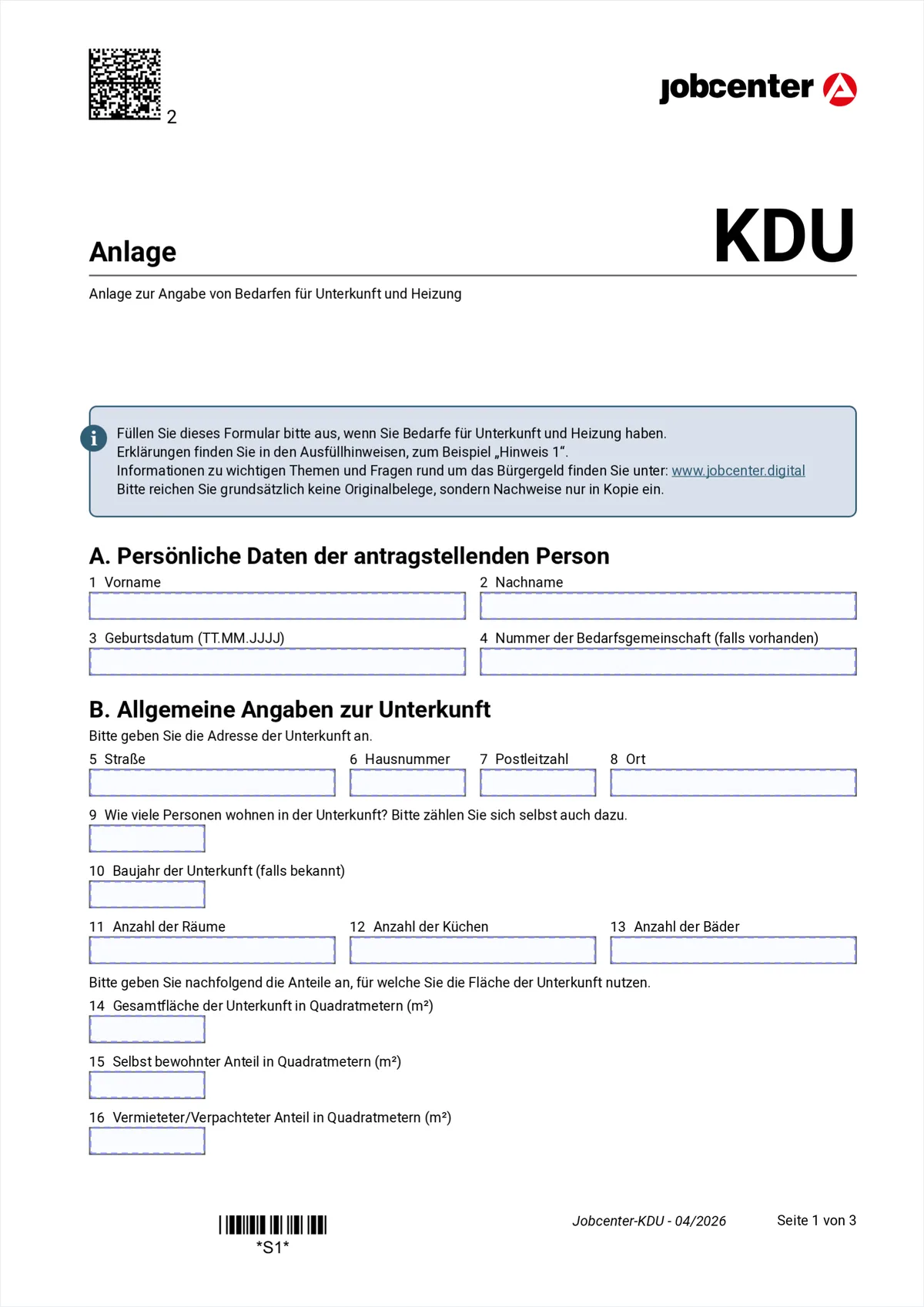
Hover or tap a marked field to see the explanation. First your details, then the home itself: address, size and how many people live in it. The Jobcenter needs these figures to judge whether the flat is appropriate for your household size.
- 1-2
- First name and surname, as in your ID and as in the Hauptantrag.
- 3
- Date of birth in the format DD.MM.YYYY.
- 4
- Bedarfsgemeinschaft number, if you already have one. It is printed on every letter from the Jobcenter. On a first application the field stays empty.
- 5-8
- Address of the flat: street, house number, postcode, town. This means the flat in question, not a previous one.
- 9
- How many people live in the accommodation. Count yourself too, and flatmates who are not part of your Bedarfsgemeinschaft.
- 10
- Year the building was constructed, if you know it. Often stated in the tenancy agreement. Otherwise leave it empty.
- 11-13
- Number of rooms, kitchens and bathrooms. Rooms means living rooms, excluding hallway, bathroom and kitchen.
- 14
- Total floor area of the accommodation in square metres, as in the tenancy agreement.
- 15
- Of that, the area you occupy yourself. If you use the whole flat alone this is the same figure as in item 14.
- 16
- Area sublet or leased out. Empty for most people.
Section A: your details
Section B: the accommodation
2. Page 2: renting or owning, and how you heat (items 17-25)
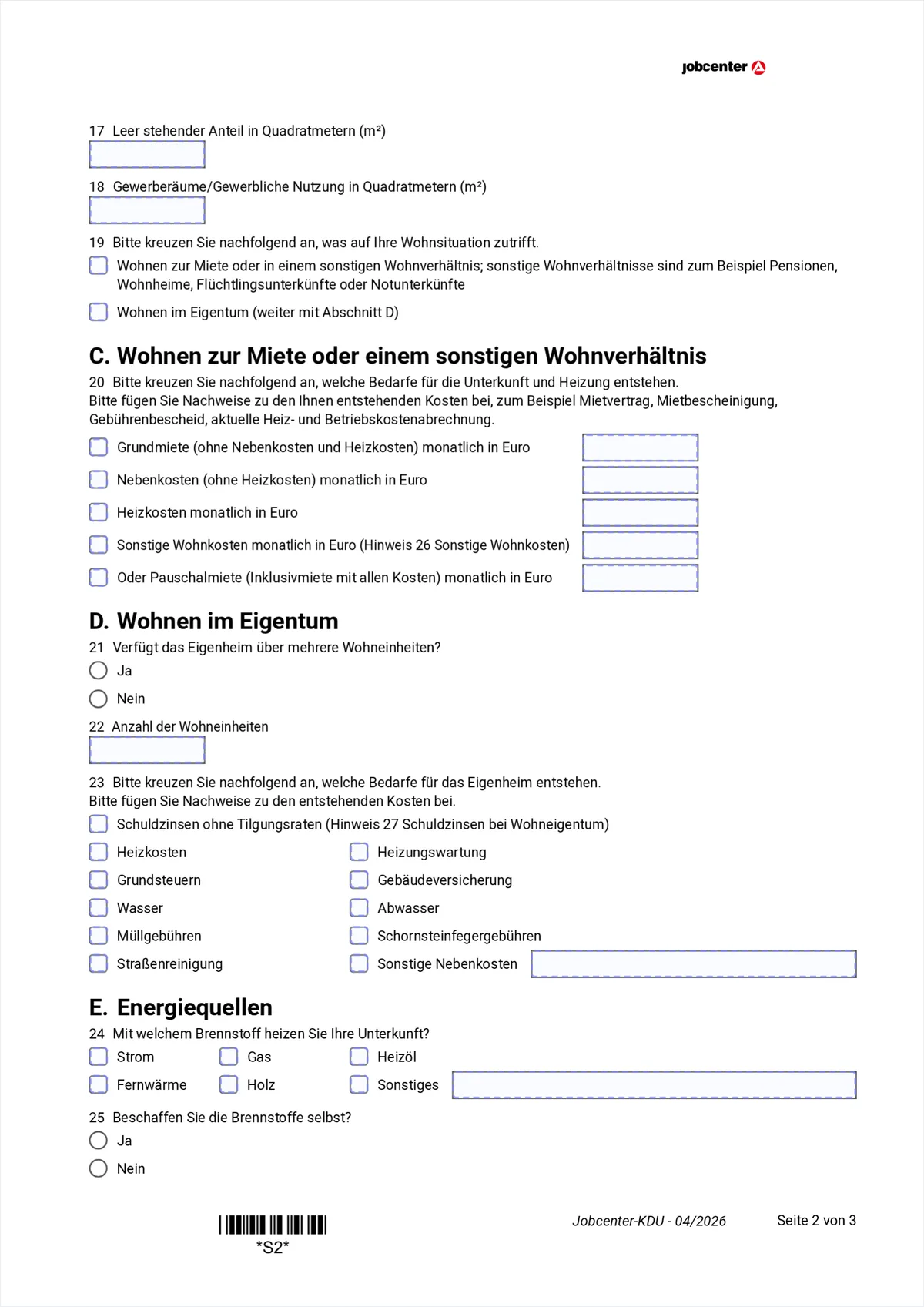
Hover or tap a marked field to see the explanation. This is where the form branches. Item 19 decides which of the two following sections you fill in: renting means section C, owning means section D. The other one stays completely empty.
- 17
- Vacant area in square metres. Empty for most people.
- 18
- Area used commercially, for example a shop unit. A home office as an employee does not count here.
- 19
- The switch: one tick. Renting or another housing arrangement, which includes guesthouses, hostels, refugee accommodation and emergency shelters. Or owning, in which case you jump straight to section D.
- 20
- Every line has a box AND a field for the monthly amount: basic rent without service charges and heating, cold service charges, heating costs, other housing costs. Always enter the three parts separately, the Jobcenter checks each one for appropriateness on its own. Only if you pay an all-inclusive rent do you use the last line instead.
- 21
- Does the house have several residential units, that is more than one self-contained flat.
- 22
- If so, the number of units.
- 23
- Tick the cost types that apply to you: debt interest without repayment instalments, heating, heating maintenance, property tax, building insurance, water, sewage, waste charges, chimney sweep fees, street cleaning, other service charges. Important: repaying the loan itself does not count, only the interest.
- 24
- What you heat with: electricity, gas, heating oil, district heating, wood or something else, which you then name next to it.
- 25
- Do you buy the fuel yourself, for example heating oil, wood or coal. If yes, the Jobcenter can cover a one-off stock for the heating season.
Section C: renting
Section D: owning
Section E: energy
3. Page 3: hot water, direct payment to the landlord, signature (items 26-40)
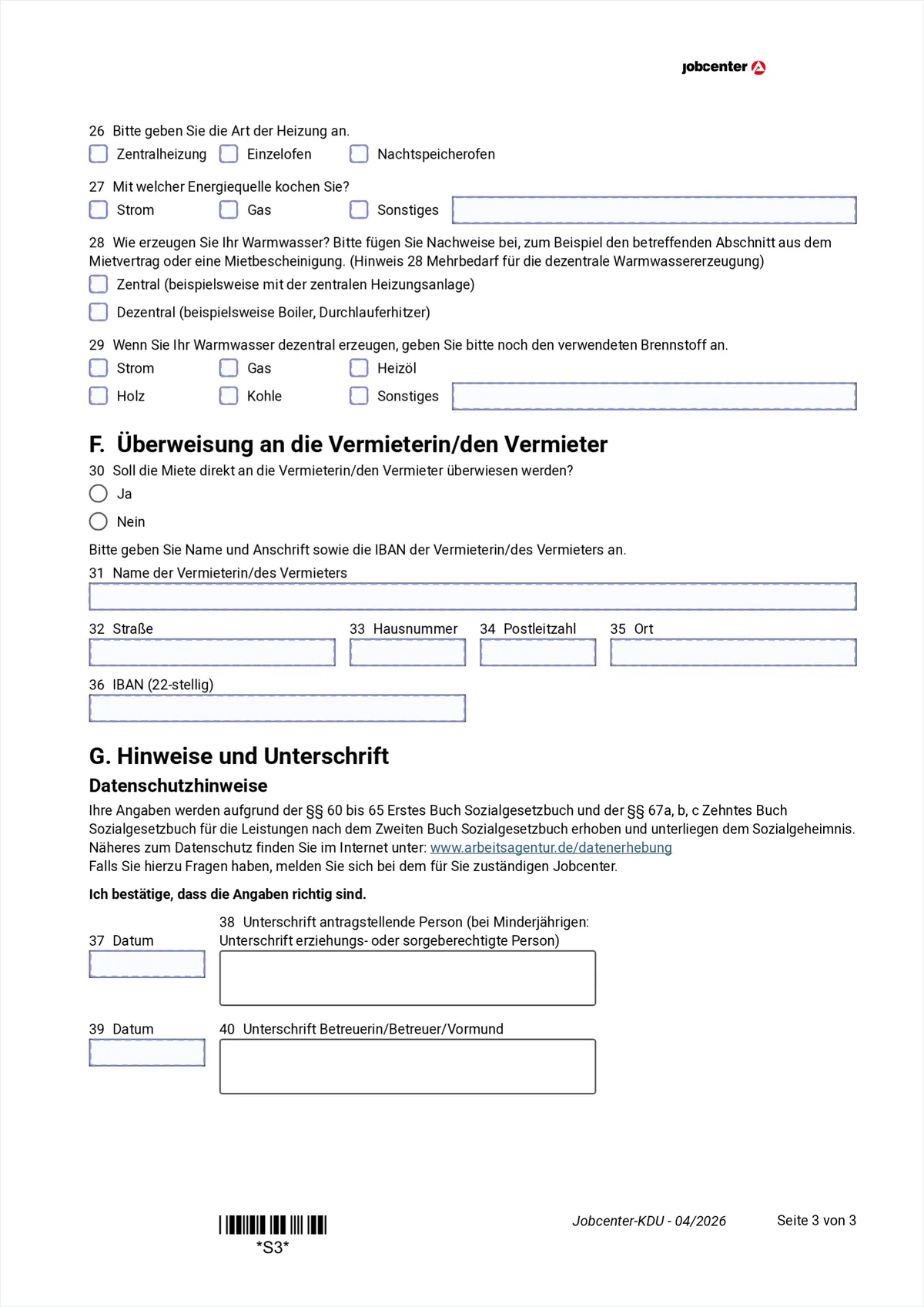
Hover or tap a marked field to see the explanation. This page holds the item that means real money: item 28. If your hot water is produced decentrally you are entitled to an extra allowance, because those costs are not part of the heating costs.
- 26
- Type of heating: central heating, individual stove or night storage heater.
- 27
- What you cook with: electricity, gas or something else, which you then name next to it.
- 28
- Zentral means the hot water comes from the heating system, so its cost is already inside the heating costs. Dezentral means a boiler or an instant water heater in the flat. Only dezentral triggers the extra allowance, so attach evidence, for example the relevant clause of your tenancy agreement.
- 29
- Only if dezentral: which fuel produces the hot water. With zentral the item stays empty.
- 30
- Should the Jobcenter transfer the rent directly instead of to you. If no, items 31 to 36 stay empty.
- 31
- Name of the landlord or the property management, as in the tenancy agreement.
- 32-35
- Address of the landlord: street, house number, postcode, town.
- 36
- The IBAN the rent goes to. This is the landlord's IBAN, NOT your own.
- 37-38
- Date and your signature. For minors a parent or the legal guardian signs.
- 39-40
- Only with legal guardianship: date and signature of the guardian. Otherwise it stays empty.
Section F: rent paid straight to the landlord
Section G: signature
4. How to fill in the KDU with explanations right on the form
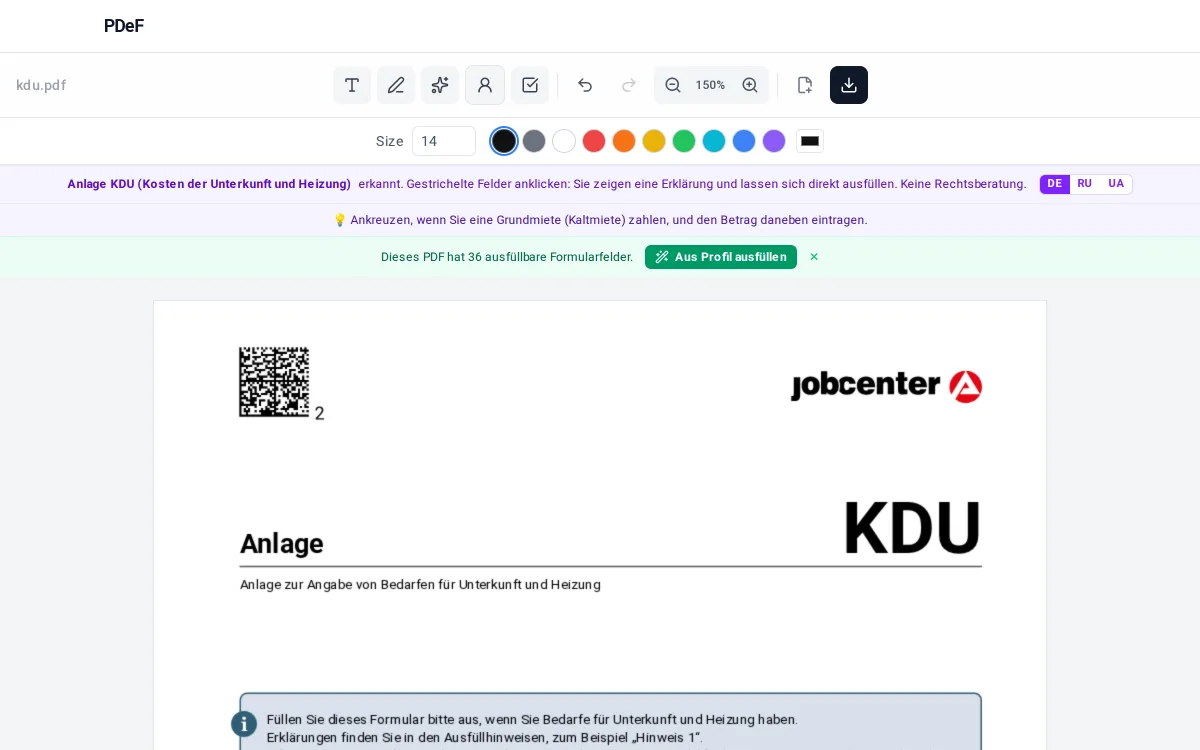
Download the Anlage KDU from jobcenter.digital or arbeitsagentur.de and open it in the free PDeF editor in your browser. The editor recognises the form automatically and marks the fields with dashed outlines: a click shows in plain language what belongs there, for example that the basic rent means without service charges and heating. Name, address and date of birth can be pulled in with one click from the local profile, you can sign via QR code with your phone, and the finished PDF downloads without a watermark. The file is not uploaded to a server: everything happens in your browser.
Tips
- Always enter the three parts of the rent separately: the Jobcenter checks basic rent, service charges and heating for appropriateness one by one.
- After a rent increase, submit the KDU again and attach the landlord's letter.
- Item 28 is the one most often filled in wrongly: a boiler or an instant water heater means dezentral and therefore an extra allowance that is otherwise simply given away.
- A section that does not apply to you stays completely empty: if you rent, leave section D untouched; if you own, leave section C.
Note, not legal advice: whether your housing costs count as appropriate depends on the local guideline figures of your Jobcenter. If you are asked to reduce your costs, a social advice centre can help.
Werbung
Frequently asked questions
Which costs belong in the Anlage KDU?
Basic rent (cold), cold service charges and heating costs. For owner-occupied property instead: debt interest, property tax, building insurance and running service charges. Repaying the mortgage does not count.
Do I have to send in the tenancy agreement?
Yes, the Jobcenter requires evidence of the costs. Submit the tenancy agreement and the current service-charge statement as copies, not originals.
What about the cost of hot water?
If the hot water is produced decentrally with electricity (a boiler, an instant water heater), tick that. There is an extra allowance for it, because those costs are not inside the heating costs.
Can I fill in the KDU on my phone?
Yes. The editor is mobile-first; you open the PDF in the phone browser, type the amounts and sign with your finger.
Can I correct the amounts afterwards?
Yes. Click into the field and retype the amount; the field can also be moved, resized or deleted. So you can adjust the entries before you download the PDF.
Can I save the filled KDU as a template?
Yes. Save the PDF; after a rent increase or in the next approval period you open it again, the editor restores your entries and you only change the amounts that changed.
Free, no account, nothing uploaded to a server
Fill a PDF now