Anlage VM: what belongs in every item of the assets form
The Anlage VM is the self-declaration of assets: 6 pages, 31 numbered items. Unlike the Anlagen EK, WEP and EKS you fill it in only ONCE, for the whole Bedarfsgemeinschaft. Everything its members own has to be declared, explicitly including assets abroad. This guide walks through the form page by page: above you see the original page, below it what belongs in each item and where to find the value. The fields on the images are interactive: hover over them or tap them. In the asset tables every row explains its column, whichever row you land on.
1. Page 1: your details and the real estate (items 1-11)
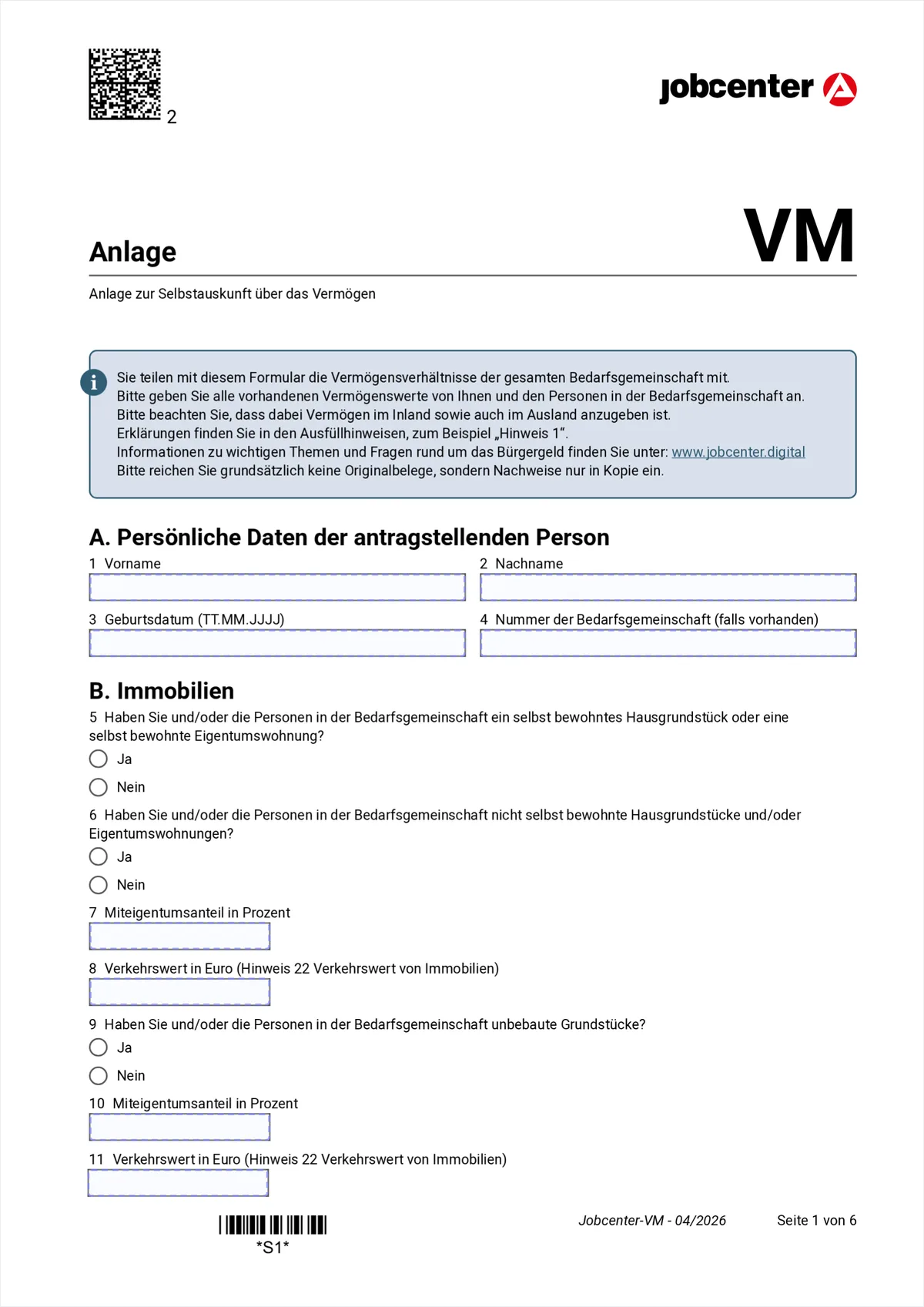
Hover or tap a marked field to see the explanation. Only one person enters their details at the top, the applicant. From section B onwards it is about everyone though: the question is always whether YOU OR a person in the Bedarfsgemeinschaft owns something.
- 1-3
- First name, surname and date of birth of the applicant.
- 4
- Bedarfsgemeinschaft number, if you have one. It is printed at the top of every letter from the Jobcenter.
- 5
- A house or flat you live in yourself. Owner-occupied property of an appropriate size is protected assets, so you have to declare it but you do not lose it because of that.
- 6
- Houses or flats that are NOT owner-occupied, for example a let flat or inherited property.
- 7-8
- Plus the co-ownership share in percent and the market value in euro. The market value is the realistic selling price today, not the purchase price back then.
- 9
- Undeveloped land, for example a field or a building plot.
- 10-11
- Co-ownership share and market value for those too.
Section A: who is applying
Section B: real estate
2. Page 2: vehicles, gifts and cash (items 12-18)
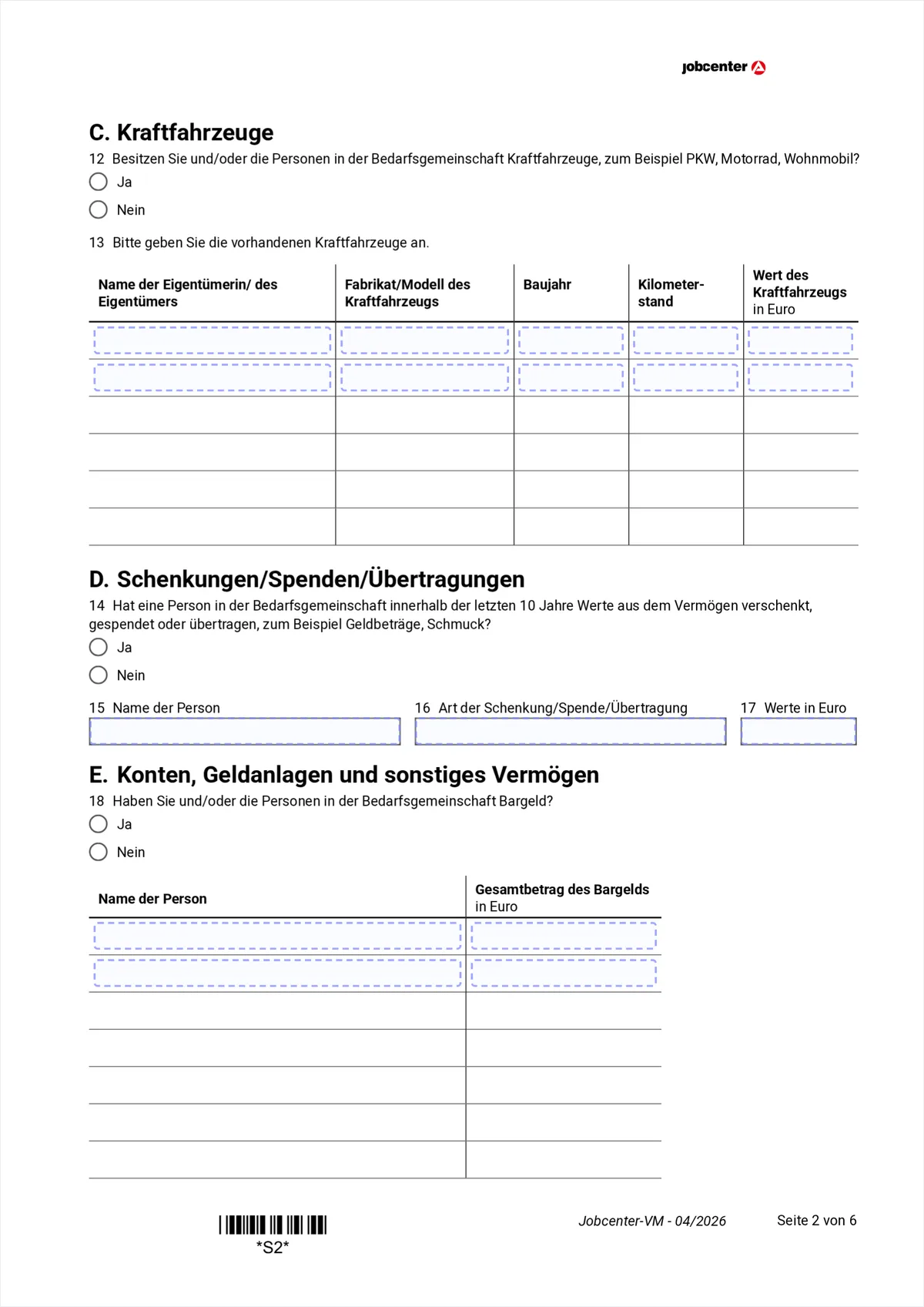
Hover or tap a marked field to see the explanation. This page holds the question that is most often underestimated: item 14 asks ten years back, not one.
- 12
- Does anyone own a motor vehicle, that is a car, a motorbike or a camper van. One appropriate vehicle per employable person usually stays protected.
- 13
- The vehicle table, one row per vehicle: name of the owner, make and model, year of manufacture, mileage and value in euro. Make, model and year are in the vehicle registration document; a realistic market price from a used-car site is enough as the value.
- 14
- Has anyone given away, donated or transferred assets in the last TEN years, for example money or jewellery. The period is deliberately long: assets given away can still be counted.
- 15-17
- Name of the person, kind of gift and the value in euro.
- 18
- Cash, meaning money at home, not the balance in accounts. In the table below, one row each: the person and the total amount.
Section C: vehicles
Section D: gifts
Section E: accounts and investments
3. Page 3: accounts and savings (items 19-20)
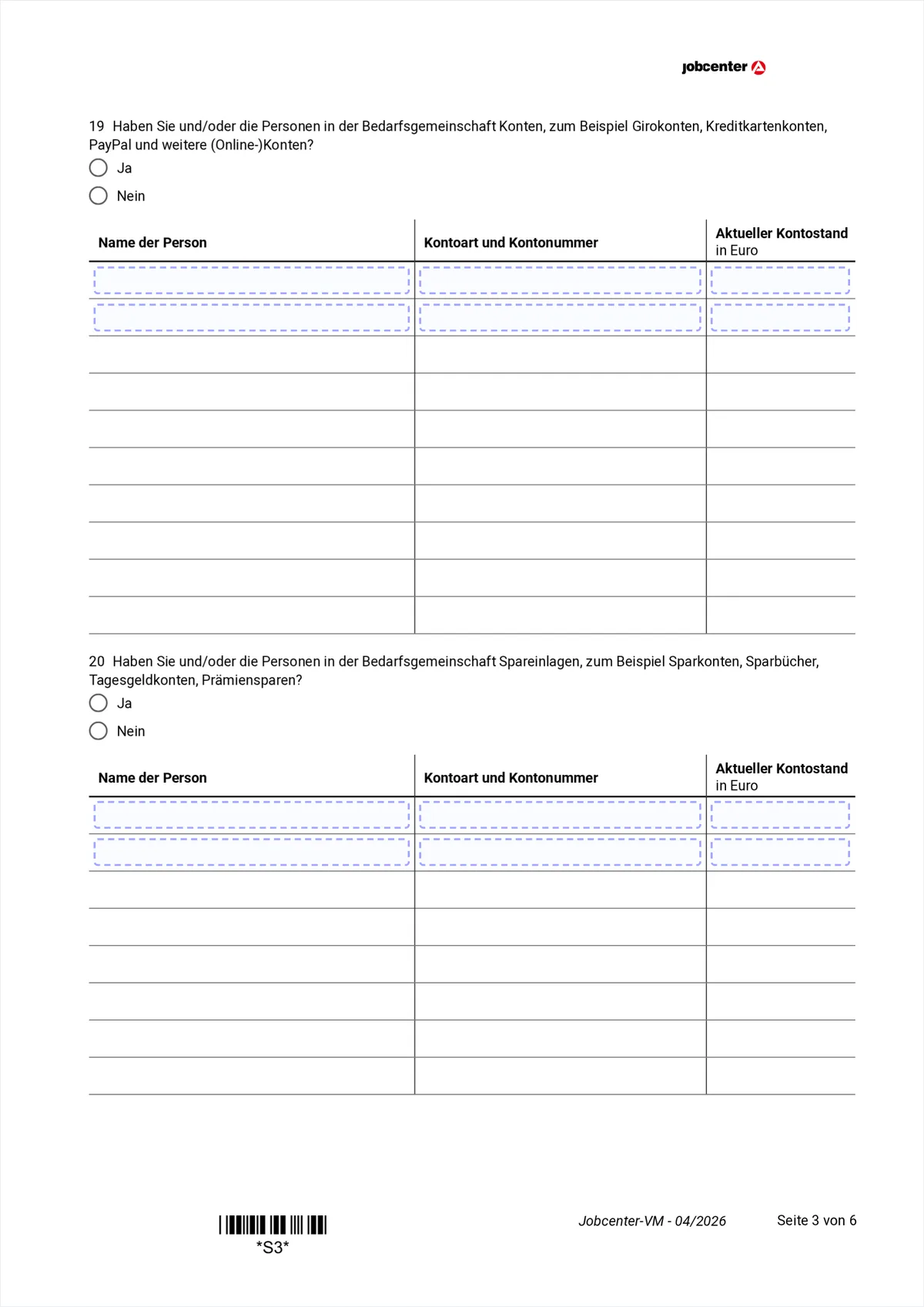
Hover or tap a marked field to see the explanation. Two identically built tables. In both: one row per account, and the first column says WHO the account belongs to. This is where it shows that the form covers the whole Bedarfsgemeinschaft.
- 19
- Accounts. That means ALL of them: current accounts, credit card accounts, PayPal and other online accounts, abroad too.
- Columns
- Per row: name of the person, account type and number, current balance in euro. The balance has to match the bank statements you attach.
- 20
- Savings deposits, for example savings accounts, savings books, instant-access accounts or Prämiensparen. The same three columns.
4. Page 4: securities, Bausparvertrag and retirement savings (items 21-23)
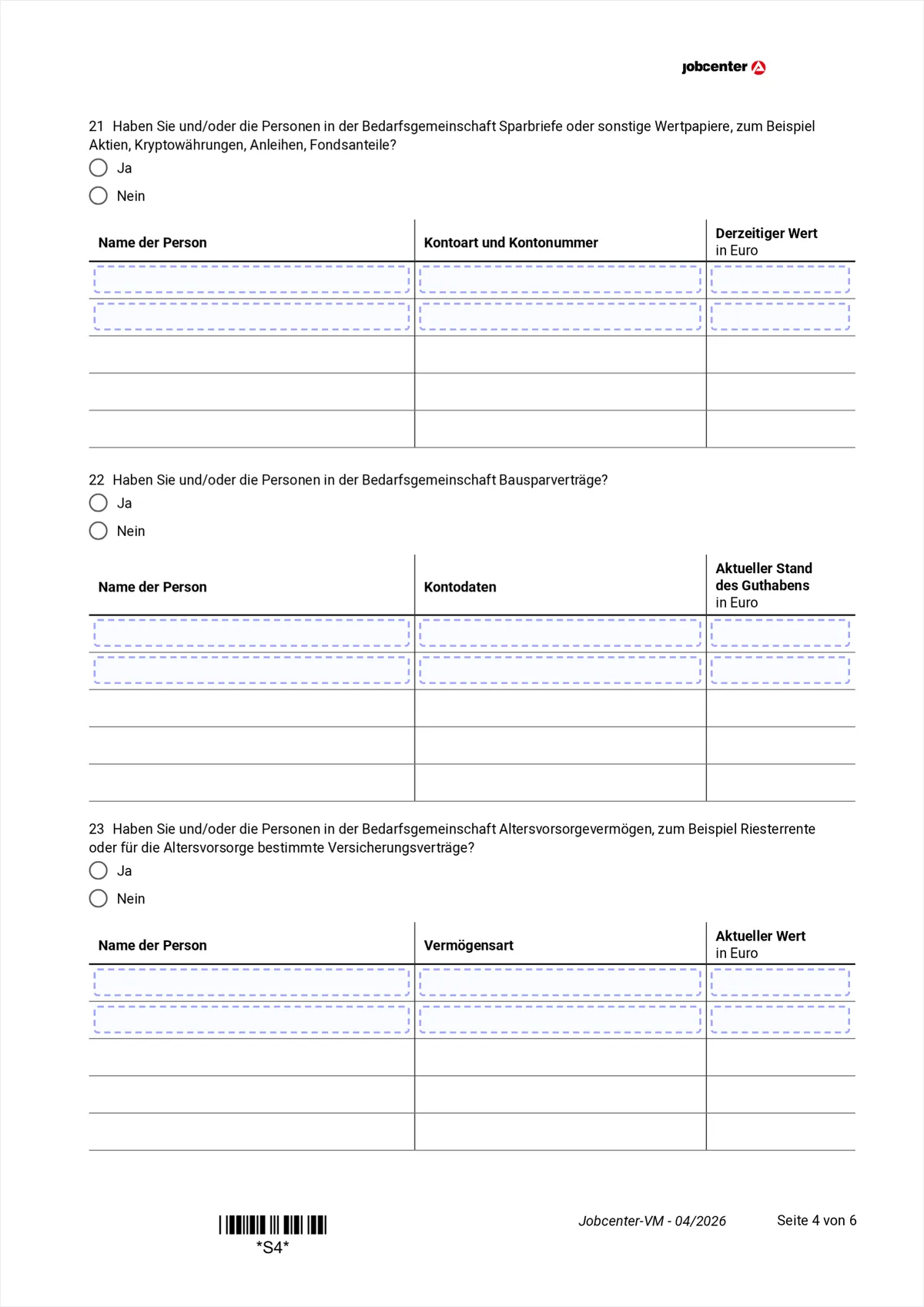
Hover or tap a marked field to see the explanation. Three tables with the same layout. Item 21 names cryptocurrencies explicitly, item 23 asks about retirement savings separately because they enjoy stronger protection.
- 21
- Savings bonds or other securities: shares, fund units, bonds and cryptocurrencies. With fluctuating prices the value at the time of the application counts.
- 22
- Bausparverträge. Per row the name of the person, the Bausparkasse with the contract number, and the current balance.
- 23
- Retirement assets, for example a Riester pension or insurance contracts intended for retirement. State-subsidised retirement assets are especially protected, which is why they get their own table. The annual statement from the provider gives the current value.
5. Page 5: insurance, other assets and self-employment (items 24-29)
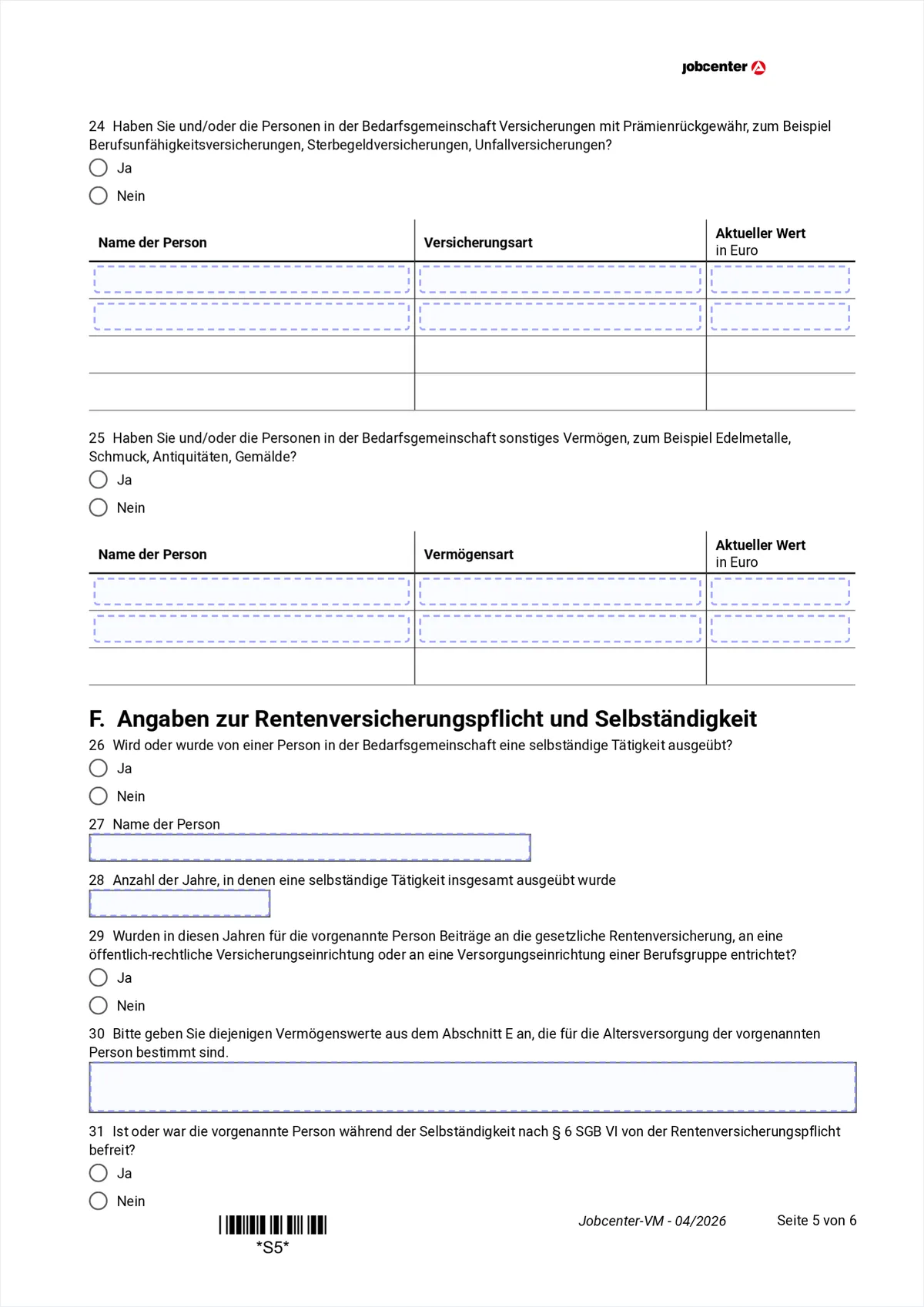
Hover or tap a marked field to see the explanation. Section F begins at the bottom and at first glance does not seem to belong in an assets form. It sits exactly right though: someone who was self-employed and outside the statutory pension insurance has their retirement savings protected more widely.
- 24
- Insurance with a surrender value, such as occupational disability, funeral or accident insurance. The surrender value counts, and the insurer will tell you it on request.
- 25
- Other assets: precious metals, jewellery, antiques, paintings.
- 26
- Does or did anyone in the Bedarfsgemeinschaft work self-employed.
- 27-28
- The name of that person and the number of years they were self-employed in total.
- 29
- Were contributions paid in those years into the statutory pension insurance or a professional pension scheme.
Section F: self-employment and pension insurance
6. Page 6: the rest of section F and the signature (items 30-31)
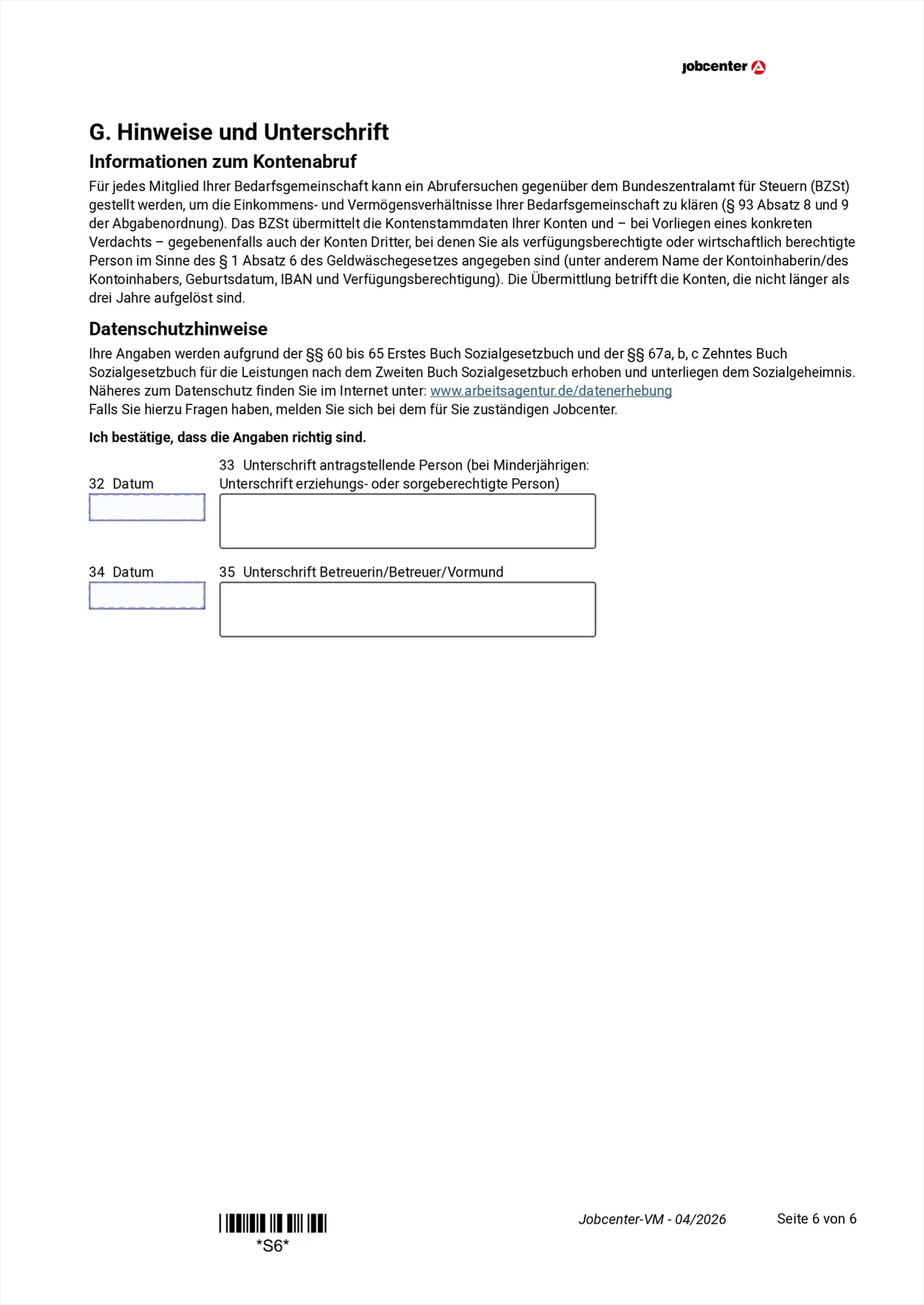
Hover or tap a marked field to see the explanation. The last question decides how much of the retirement savings is protected, after that only the signature is left.
- 30
- Was there compulsory insurance in the statutory pension scheme during that time. If no, the retirement assets are protected to a greater extent.
- 31
- Date and signature. For minors a parent or the legal guardian signs; with legal guardianship the guardian signs below.
7. How to fill in the VM with explanations right on the form
Download the Anlage VM from jobcenter.digital or arbeitsagentur.de and open it in the free PDeF editor in your browser. The editor recognises the form automatically and explains every field in plain language, including inside the asset tables: click any row and you see what belongs in that COLUMN. Name, address and date of birth can be pulled in with one click from the local profile, and you can sign via QR code with your phone. The file is not uploaded to a server: everything happens in your browser.

Tips
- The VM is filled in once for the WHOLE Bedarfsgemeinschaft, not per person. That is why every table row states who the item belongs to.
- Assets abroad belong here explicitly, including an account or a plot of land in your country of origin.
- Item 14 reaches ten years back: assets given away or transferred are asked about and can be counted.
- Declaring is not losing: owner-occupied property, an appropriate vehicle and subsidised retirement savings are protected within certain limits.
Note, not legal advice: which assets count as protected and which allowances apply in your case is decided by your Jobcenter. For questions, the official filling instructions of the Bundesagentur für Arbeit or a social advice centre can help.
Werbung
Frequently asked questions
Do I have to fill in the Anlage VM for every person separately?
No. Unlike the Anlagen EK, WEP and EKS the VM is filled in once for the whole Bedarfsgemeinschaft. In the tables each row states which person the item belongs to.
Do I lose my car or my flat if I declare them?
Declaring first of all only means the Jobcenter knows the value. Owner-occupied housing of an appropriate size, one appropriate vehicle per employable person and subsidised retirement savings are protected. Concealing them, on the other hand, can lead to repayment demands and criminal proceedings.
Do assets abroad belong here too?
Yes, explicitly. An account, a house or a plot of land in your country of origin goes into the Anlage VM just like assets in Germany.
Do cryptocurrencies count as assets?
Yes. Item 21 names cryptocurrencies explicitly alongside shares, fund units and bonds. The value at the time of the application is what counts.
Why are gifts from the last ten years asked about?
Because various transferred assets can still be taken into account. Item 14 exists to spot such transfers; it does not automatically mean the benefit will be reduced.
Can I save the filled VM as a template?
Yes. Save the PDF; at the next application or renewal you open it in the editor again, your entries are restored and you only update the amounts that changed.
Free, no account, nothing uploaded to a server
Fill a PDF now